Deploying Engineering Resource Management Knowledge Graph on AWS
- Pratik Kulkarni
- AWS , Cloud Architecture
- 21 May, 2026
- 10 Mins read
Resource planning in engineering orgs is a multi-hop problem. The data is there — skills, project history, availability — it’s just stored in flat tables that you need to join on demand. This post walks through building a knowledge graph that can answer questions like that, and can also answer follow-ups like “of those people, which ones are based in BLR?” without losing context. The full code is on GitHub.
Why a graph, not a table?
Engineering resource data is inherently relational in a way that rows and columns don’t capture well. A person has skills, worked on projects, belongs to a team, and those projects served clients and used other skills. Each of those connections carries its own data — how many years of experience, what role they played, at what proficiency level.
SQL can model this — you’d use a handful of JOIN tables — but multi-hop queries get painful fast. “Find engineers who worked alongside someone with Kafka expertise on a project that served a fintech client, and who are themselves available” is three hops. In SQL that’s three or four JOINs and a subquery. In a graph database it’s a natural traversal.
The other thing a graph handles well is follow-up questions. When a user asks “who has Kafka and AWS experience?” and then “out of those, who is available?”, the second question should narrow the first result — not start a fresh query. We handle this by passing the last few Cypher queries as conversation history to the LLM, so it can merge constraints rather than generate a new query from scratch.
What we built
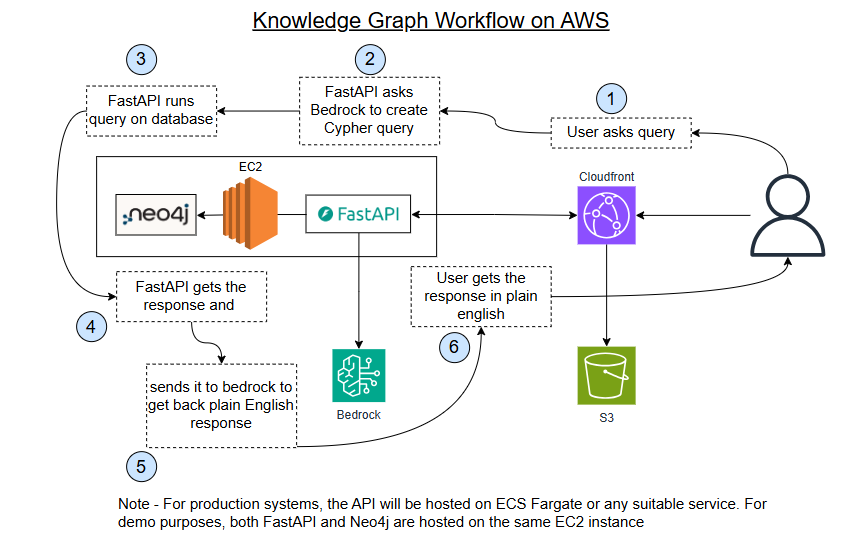
The stack:
- Neo4j for the graph database,
- FastAPI on an EC2 instance for the API,
- Amazon Bedrock for LLM calls (Claude for query generation and answer synthesis, Titan for embeddings),
- a React frontend hosted on S3,
- CloudFront in front of everything,
- IaC managed by Terraform.
One detail worth noting: ACM-managed certificates can’t be installed directly on EC2 — ACM only integrates with AWS-managed services like ALB, CloudFront, and API Gateway. That means direct HTTPS calls from the browser to the EC2 API would fail as mixed-content (you could use Let’s Encrypt on the instance, but that adds maintenance overhead for a demo). Rather than set up an ALB and ACM certificate, we route /api/* through CloudFront as a second origin. CloudFront handles the HTTPS termination from the browser, and talks to the EC2 instance over HTTP on port 8000 internally. It works cleanly for a demo; in production you’d use an ALB.
The query flow, step by step:
- User types a question in the chat panel
- The API sends it to Claude along with a schema prompt that describes all the node types, relationship types, and query rules
- Claude returns a Cypher query (bedrock.py)
- The API runs that Cypher against Neo4j
- The raw results go back to Claude, which writes a plain-English answer
- The response also includes the IDs of every node and relationship that appeared in the results
- The frontend highlights those nodes in the graph
The schema prompt Claude receives is the key piece — it encodes the full ontology so Claude generates valid, consistent Cypher every time:
You are a Cypher query generator for a Neo4j knowledge graph.

Schema:
Nodes:
  Person(id, name, role, seniority, availability, location)
  Skill(id, name, category)
  Project(id, name, status, start_date, end_date, description)
  Client(id, name, industry, size)
  Team(id, name, location, lead)

Relationships:
  (Person)-[:HAS_SKILL {proficiency, years}]->(Skill)
  (Person)-[:WORKED_ON {role, from, to}]->(Project)
  (Person)-[:MEMBER_OF]->(Team)
  (Project)-[:FOR_CLIENT]->(Client)
  (Project)-[:USED_SKILL]->(Skill)
  (Team)-[:DELIVERED]->(Project)

Rules:
- Return ONLY valid Cypher with no explanation, comments, or markdown fences.
- Use MATCH and RETURN; avoid WRITE operations.
- When filtering by availability, use: WHERE p.availability = true
- Skill names are exact. Match case-insensitively with toLower().
- ALWAYS RETURN full node/relationship variables (e.g., RETURN p, r, sk).
- FOLLOW-UP RULE: When the question refines a previous result, generate a single
  Cypher that combines ALL prior constraints with the new one.
A note on Cypher: Cypher is Neo4j’s query language. Where SQL asks “join this table to that table”, Cypher describes patterns in the graph directly. (p:Person)-[:HAS_SKILL]->(s:Skill {name: "Kafka"}) reads almost like a sentence — find a Person connected by a HAS_SKILL relationship to a Skill node named Kafka. It’s what makes graph queries readable once you’ve seen a few, and it’s also what makes LLM-based query generation work well: Cypher’s syntax is close enough to natural language that Claude generates valid queries reliably.
Here’s what Claude actually generates for “who has Kafka and AWS experience and is available?”:
MATCH (p:Person)-[:HAS_SKILL]->(s1:Skill), (p)-[:HAS_SKILL]->(s2:Skill)
WHERE toLower(s1.name) = 'kafka'
  AND toLower(s2.name) = 'aws'
  AND p.availability = true
RETURN p
And when the user follows up with “out of those, who is based in London?” — rather than a fresh query, Claude merges the constraints:
MATCH (p:Person)-[:HAS_SKILL]->(s1:Skill), (p)-[:HAS_SKILL]->(s2:Skill)
WHERE toLower(s1.name) = 'kafka'
  AND toLower(s2.name) = 'aws'
  AND p.availability = true
  AND p.location = 'London'
RETURN p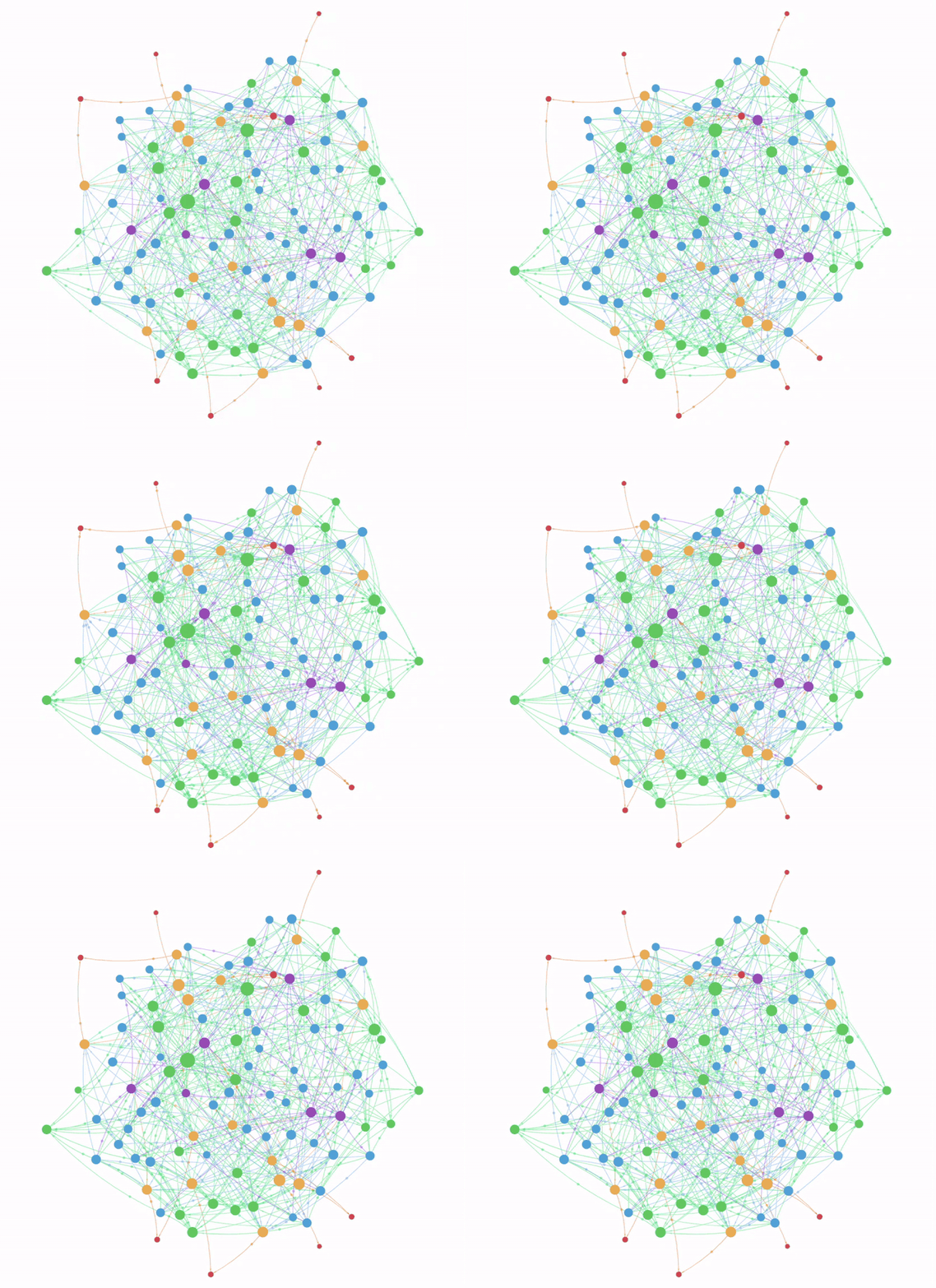
A (cautionary) note on Ontology
Before writing any code, the most consequential decision is your ontology — what becomes a node, what becomes a property on a node, and what becomes a relationship.
In a relational database, schema changes are annoying but manageable — an ALTER TABLE or a data migration script. In a graph, changing a node type means touching every instance of that node and every relationship connected to it. If you have 50,000 Person nodes and you decide mid-project that availability should actually be a separate Availability node (so you can model availability windows, not just a boolean), you’re writing a migration that re-creates 50,000 nodes and re-links every edge. The graph doesn’t have a concept of a column rename. You have to traverse it.
So get the model right first. The way to do that is to write down the ten most important questions you want the system to answer, then trace the graph traversal each one requires. The ontology should make those traversals natural.
For our schema we settled on five node types:
Person(id, name, role, seniority, availability, location)
Skill(id, name, category)
Project(id, name, status, start_date, end_date, description)
Client(id, name, industry, size)
Team(id, name, location, lead)
With relationships:
(Person)-[:HAS_SKILL {proficiency, years}]->(Skill)
(Person)-[:WORKED_ON {role, from, to}]->(Project)
(Person)-[:MEMBER_OF]->(Team)
(Project)-[:FOR_CLIENT]->(Client)
(Project)-[:USED_SKILL]->(Skill)
(Team)-[:DELIVERED]->(Project)
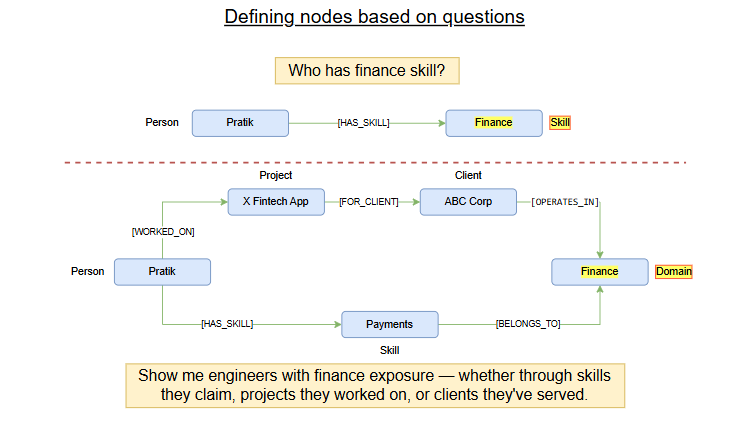
One decision that illustrates the tradeoffs: “Fintech Domain” appears in our schema as a Skill with category: "domain" rather than as its own Domain node type. For this demo that’s fine. But if you wanted to ask “show me engineers with fintech exposure — whether through direct skill claims, projects they worked on, or clients they’ve served”, you’d need Domain as a first-class node with its own traversal paths.
Seeding the graph — and what a production pipeline looks like
For this demo we seeded the graph with generated data: 50 engineers, 25 skills, 15 projects, 8 clients, 6 teams. The seed script is straightforward Python using Faker for names and dates, with a fixed set of real-looking entities for everything else.
One thing worth highlighting: we built in 6 “guaranteed” demo-ready people — engineers who definitively have AWS and Kafka expertise, are marked available, and have worked on fintech projects. Without this, a demo query like “who has Kafka and AWS experience and is available?” might return zero results if the random generation doesn’t produce the right combination. For any demo graph, explicitly seeding known-good data for your key queries is worth doing.
In production, your data sources split into two tiers.
Structured sources expose APIs and give you clean entity data:
- Workday or BambooHR for headcount, roles, and team membership;
- GitHub or GitLab for project contribution history and repository membership;
- Jira or Linear for project assignment and delivery history. These map relatively directly to graph nodes — a GitHub org member becomes a Person, a repository becomes a Project, a merged PR is evidence of a WORKED_ON relationship.
Unstructured sources are where the richest signal lives but extraction is harder:
- CVs and recruiting profiles from Greenhouse or Lever,
- project briefs and post-mortems in Confluence or Notion,
- performance reviews in Lattice or Culture Amp, 1:1 notes in Google Docs. These are PDFs, Word documents, free-form text — no API gives you a structured skill list from a performance review.
A practical ingestion pipeline handles both:
Structured (Workday, GitHub, Jira)
    → direct API extraction → entity mapping → Neo4j MERGE

Unstructured (Confluence, Greenhouse CVs, Notion docs)
    → document fetch → LLM extraction (JSON matching your schema)
    → confidence scoring → validation → Neo4j MERGE
Both paths share the same write layer — idempotent MERGE statements so re-running on updated records doesn’t duplicate data. The difference is what happens before the write: structured sources need entity mapping, unstructured sources need LLM extraction plus a confidence layer.
That confidence layer is where judgment is required. “Has worked with AWS” buried in a project description is weak signal. “AWS Certified Solutions Architect” in a CV skills section is strong. You want the extraction prompt to score these differently and route low-confidence extractions for human review rather than auto-ingesting them into the graph.
What changes in production
This demo is intentionally minimal. A few things you’d change before putting it in front of a real organisation:
Neo4j AuraDB instead of self-managed. Running Neo4j on a single EC2 instance works fine for a demo but gives you no backups, no replication, and a maintenance burden. AuraDB is Neo4j’s managed cloud offering — you get automatic backups, point-in-time restore, and scaling without managing the instance.
ECS or Lambda for the API. The FastAPI service is stateless, so it’s a natural container workload. Running it on ECS with a Fargate task gives you auto-scaling and removes the need to manage an EC2 instance.
ALB + ACM for HTTPS termination. The CloudFront proxy approach works but it’s a workaround. An Application Load Balancer with an ACM certificate gives you proper TLS at the API layer and access logging. WAF can attach to either CloudFront or an ALB — if you’re already running CloudFront, you can add a Web ACL there without an ALB, which is one less component to manage.
VPC endpoint for Bedrock. By default, Bedrock calls go over the public internet from your VPC. A VPC interface endpoint keeps that traffic on the AWS private network — relevant both for security compliance and for predictable latency.
A proper ingestion service. Rather than a POST /ingest endpoint that reseeds everything, you’d have a separate ingestion service triggered by EventBridge events (a new hire in Workday, a closed ticket in Jira) that runs incremental updates.
The core architecture — graph database, LLM-generated Cypher, natural-language answer synthesis, node highlighting — stays the same. The production changes are mostly operational: managed services, proper networking, secrets management.
Can LLMs finally make Knowledge Graphs mainstream?
Knowledge graphs are not a new idea. Google’s Knowledge Graph has been running since 2012. The semantic web dates to the early 2000s. Enterprise knowledge graphs have existed in large organisations for years, typically maintained by teams of ontology engineers who spent their careers on data modelling and manual curation.
The problem, until recently, was getting that data into the graph. You could write parsers for structured sources (Jira has an API, so does GitHub), but CVs are PDFs, project briefs are Word documents, domain knowledge lives in Confluence pages. Extracting entities and relationships from unstructured text and mapping them to a fixed schema was either a manual data entry job or a brittle NLP pipeline that required constant maintenance.
This is where LLMs change the equation. Give Claude a CV and a description of your schema, and it reliably extracts Person properties, identifies Skill nodes with proficiency context, and infers WORKED_ON relationships from project descriptions — including normalisation (“Amazon Web Services” → AWS, “React.js” → React). The same applies to project briefs, which can populate Project, Client, and USED_SKILL nodes in one pass.
A paragraph like this:
Senior Software Engineer at DataPulse (2021–2024). Led the migration of the batch
analytics pipeline from Spark on-prem to AWS EMR, reducing processing time by 40%.
Worked closely with the Kafka team on real-time data ingestion.
Certified AWS Solutions Architect (2022).
Becomes this:
{
  "person": { "role": "Senior Engineer", "seniority": "senior" },
  "skills": [
    { "name": "AWS",   "proficiency": "expert",       "evidence": "Certified AWS Solutions Architect" },
    { "name": "Spark", "proficiency": "intermediate",  "evidence": "led migration from Spark on-prem" },
    { "name": "Kafka", "proficiency": "intermediate",  "evidence": "worked with Kafka team on ingestion" }
  ],
  "projects": [
    { "name": "Analytics Pipeline Migration", "role": "Tech Lead", "from": "2021", "to": "2024" }
  ]
}
Notice the confidence differentiation: AWS gets expert because there’s a certification; Kafka gets intermediate because the signal is “worked with” rather than “led.” That distinction — surfaced automatically from the text — is what makes the extracted data trustworthy enough to query against.
The natural-language query generation is the second meaningful unlock. An organisation might have the graph, but if the only people who can query it are the ones who know Cypher, its value is limited to the data team. Translating “who are the available Kafka engineers who’ve worked on payments” into a graph traversal and back into a plain-English answer opens it up to everyone — engineering managers, resource planners, recruiters — without any training.
Together these two things — extraction and querying — make knowledge graphs viable for organisations that can’t staff a dedicated knowledge engineering team. A small team can build and maintain something genuinely useful.
Key takeaways
- Ontology is the most important decision and the hardest to undo. Model for the queries you expect, not the data you have today. Sketch your top ten questions, trace the graph traversals, then design the schema. Changing a node type in production means touching every instance and every edge — there’s no graph equivalent of
ALTER TABLE. - Your source data splits into two tiers with different extraction paths. Structured sources (GitHub, Jira, Workday) map cleanly via APIs. Unstructured sources (CVs, Confluence, performance reviews) need LLM extraction with a confidence layer before anything touches the graph.
- The AI unlock is entity and relationship extraction from unstructured text. LLMs can turn a CV or a project brief into structured graph data that conforms to your schema — including normalisation across inconsistent naming. That pipeline used to require a dedicated NLP team or manual data entry. Now it’s a well-crafted prompt.
- Natural-language querying is what makes the graph usable beyond the data team. Once you’ve built the graph, Cypher is a barrier for everyone who isn’t a developer. LLM-generated queries remove that barrier entirely.
The full code — Terraform, FastAPI backend, seed data, React frontend — is at github.com/pratiksk/talent-graph-aws.